How to Size a Google Ads Budget Before You Spend a Dollar

Size a Google Ads budget backward from the goal, not forward from what feels affordable. Monthly budget equals the customers you want, divided by your close rate, divided by your click-to-lead rate, multiplied by your segment's cost per click. A plumber who wants 40 jobs a month at $41 a click needs about $18,000.
A med spa that wants 60 first visits at $8.72 a click needs about $11,000. Below that number the campaign cannot deliver the goal no matter how well it is run, and a budget that cannot buy roughly 100 clicks a week cannot even tell you whether it is working.
Start with the goal, not the budget
Most Google Ads budgets are set the wrong way round.
An owner decides what feels affordable, usually $1,500 or $3,000 a month, runs it for a quarter, and then judges the platform by what came back. The budget was never connected to a goal, so the result cannot be judged against one. Google Ads did not fail.
The number was never going to work.
The right order is backward. Decide how many new customers you want from search in a month. Divide by the share of leads that become customers.
Divide again by the share of clicks that become leads. Multiply by what a click costs in your segment.
That is the budget. Four numbers, three of them yours, and the arithmetic takes a minute. Our Google Ads budget calculator runs it with our September 2026 cost-per-click data pre-filled.
Put your own close and click-to-lead rates in and override the defaults.
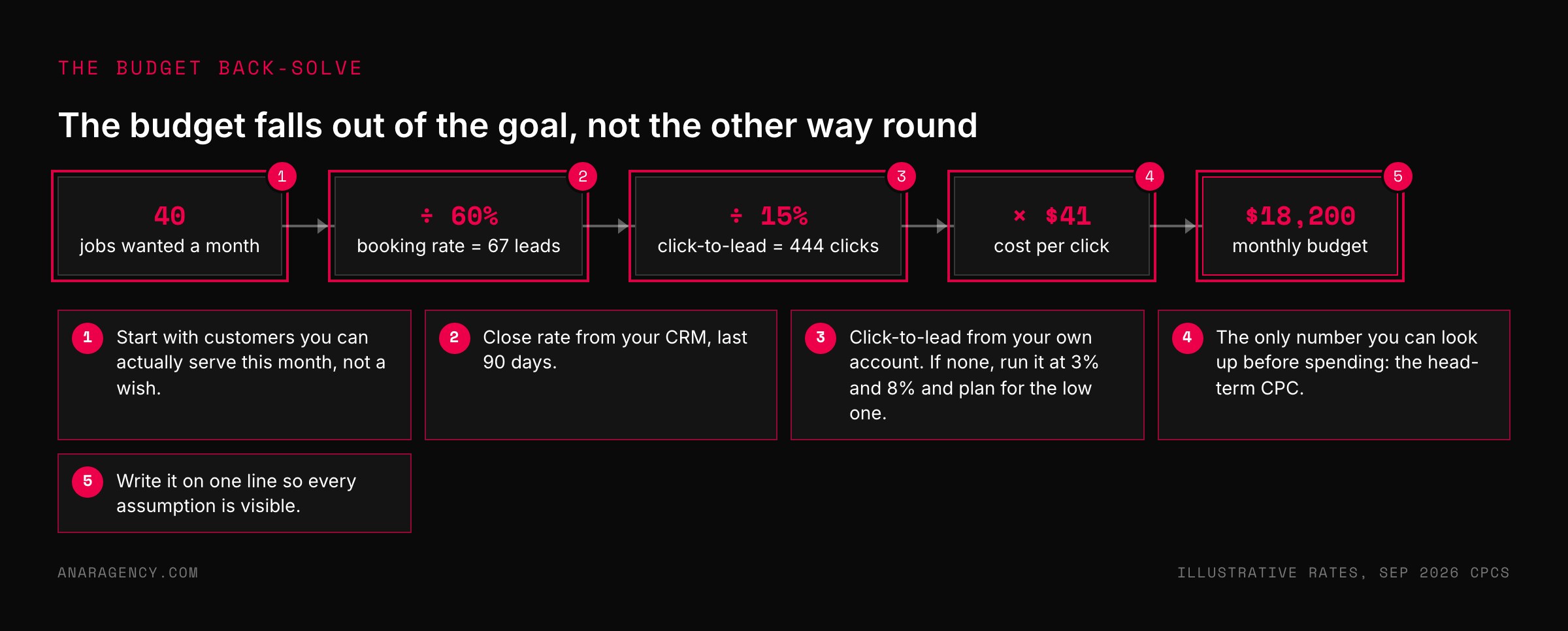
Take a plumbing company that wants 40 booked jobs a month. Six in ten leads book, so it needs 67 leads. Fifteen in a hundred clicks become a lead, so it needs about 444 clicks.
The head-term basket for plumbing runs $41 a click, so the budget is roughly $18,200.
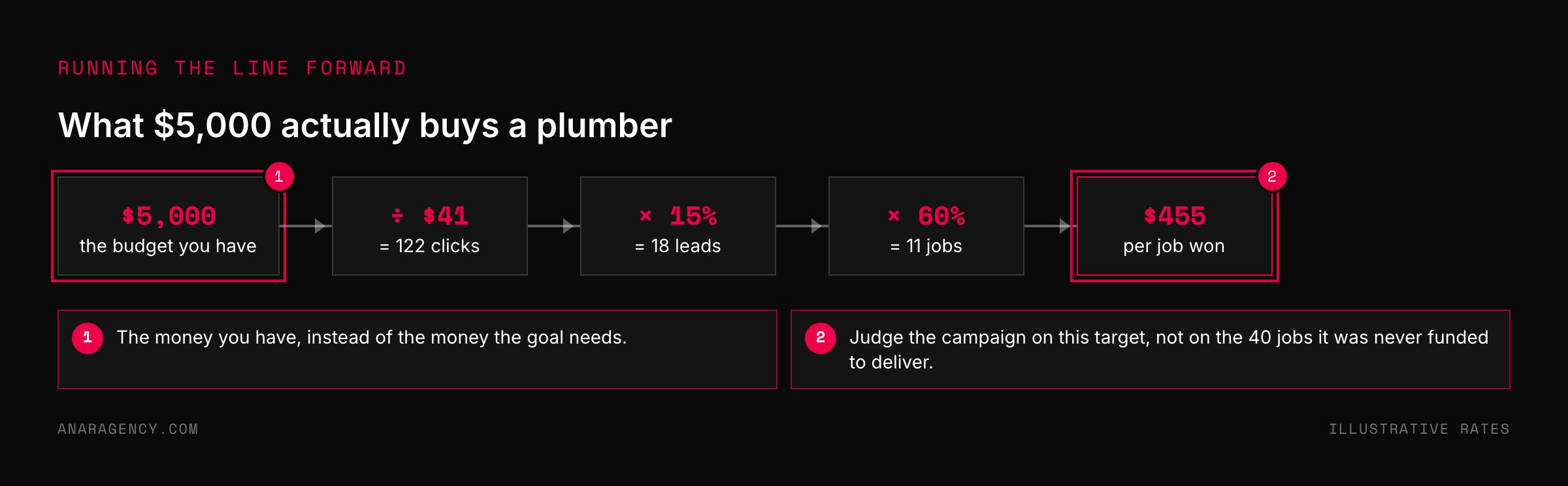
If the owner has $5,000, the honest answer is not "try it and see." It is "this budget buys about 11 jobs, is that worth it?" Usually it is, and now the campaign has a target it can be measured against.
Where the four numbers come from
Customers you want is a business decision, not a marketing one. It should be the number of new customers the business can actually serve this month, not a wish. A clinic that can take 30 new patients should not buy 60.
Close rate is the share of leads that become paying customers. Read it from your CRM or your appointment book over the last 90 days. If you have never tracked it, start now and use a conservative guess until you have 50 leads of history.
Google's own guide to the different ways to track conversions covers phone calls, forms, and imported offline sales, which is how the close rate eventually gets back into the account.
Click-to-lead rate is the one people borrow from a benchmark table, and the one we tell clients not to borrow. It depends on your landing page, your offer, your match types, and what you count as a lead. Use your own account over the last 90 days.
If there is no account yet, run the math twice, once at 3 percent and once at 8 percent, and plan for the lower number. Our article on Google Ads cost per click by industry explains why published conversion-rate averages describe nobody in particular.
Cost per click is the only number you can look up before spending. Google's Keyword Planner shows top-of-page bid ranges for any keyword, and its forecasts estimate clicks and cost for a keyword list at a given budget.
We publish the top-of-page average for a head-term basket in 50 segments on our benchmarks page, refreshed monthly, so you can get the number without opening an account.
Write the budget on one line so every assumption is visible. Customers wanted divided by close rate equals leads needed. Leads needed divided by click-to-lead rate equals clicks needed.
Clicks needed times cost per click equals budget. Then check the budget against the testing floor of about 100 clicks a week per campaign. If it clears the floor, run it.
If it does not, run the line forward from the money you have, set that smaller goal, and judge the campaign against it.
The testing floor: the smallest budget that can tell you anything
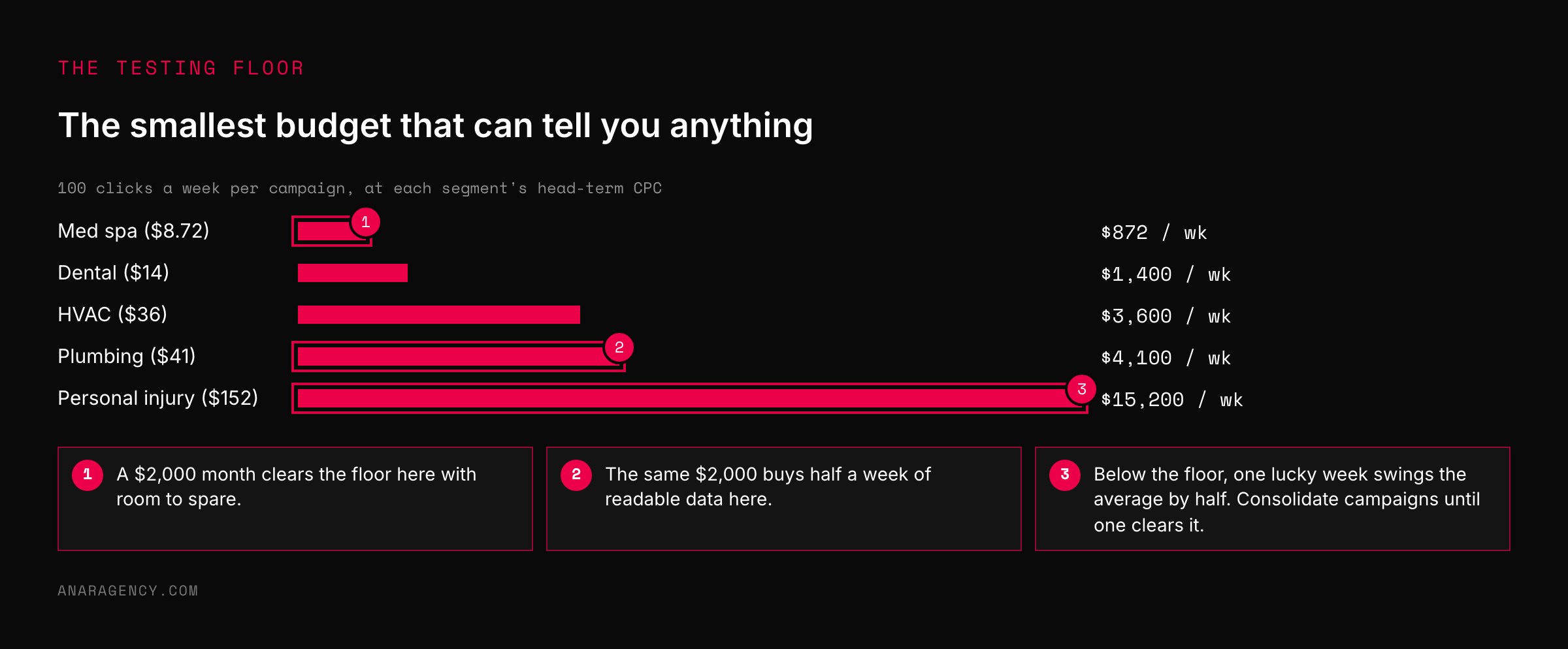
There is a second budget number, and it is a floor, not a target. A campaign has to buy enough clicks to produce a result you can read.
If it cannot, the budget is not small. It is wasted, because at the end of the month you will not know whether to keep going.
Our working floor is 100 clicks a week per campaign, which at a 5 percent click-to-lead rate produces five leads a week and about 20 a month. Twenty leads is the point where a cost per lead starts to mean something and a landing-page change can be seen in the numbers. Below that, one lucky week or one bad one swings the average by half.
At $41 a click that floor is $4,100 a week for a plumber. At $8.72 it is $870 for a med spa. The floor scales with the segment, which is why a $2,000 budget can be plenty for one business and noise for another.
Google's automated bidding has its own floor. The platform's Smart Bidding strategies learn from conversion data, and Google's own guidance on finding success with Smart Bidding is explicit that strategies perform better with more conversions to learn from.
A campaign that produces three conversions a month is not giving the algorithm enough to work with, and its bids will wander. If the budget cannot reach the floor, consolidate campaigns until one of them can.
The Budget Back-Solve: four numbers, one answer
We run every new-account budget conversation through the same four-step back-solve, and we write the result on one line so the owner can see each assumption.
Customers wanted, divided by close rate, equals leads needed. Leads needed, divided by click-to-lead rate, equals clicks needed. Clicks needed, times cost per click, equals budget.
Budget, compared to the testing floor, tells you whether the campaign can be read at all.
The line is more useful than the total, because it shows which assumption is doing the work. If a budget comes out at $45,000 for a law firm, the owner can see that the 5 percent click-to-lead rate and the $152 click are the drivers. The conversation turns to whether a better landing page or a narrower keyword set could move either one.
That is a strategy conversation. "Can we afford $45,000" is not.
It also keeps the budget honest in the other direction. When the back-solve says $18,000 and the owner has $5,000, run it forward: $5,000 buys 122 clicks, 18 leads, 11 jobs. If eleven jobs at $455 each is worth having, run the campaign with that target and judge it on that target.
Most of the "Google Ads doesn't work for us" verdicts we hear come from accounts that were judged against a goal the budget could never have reached.
What Google's daily budget setting actually does
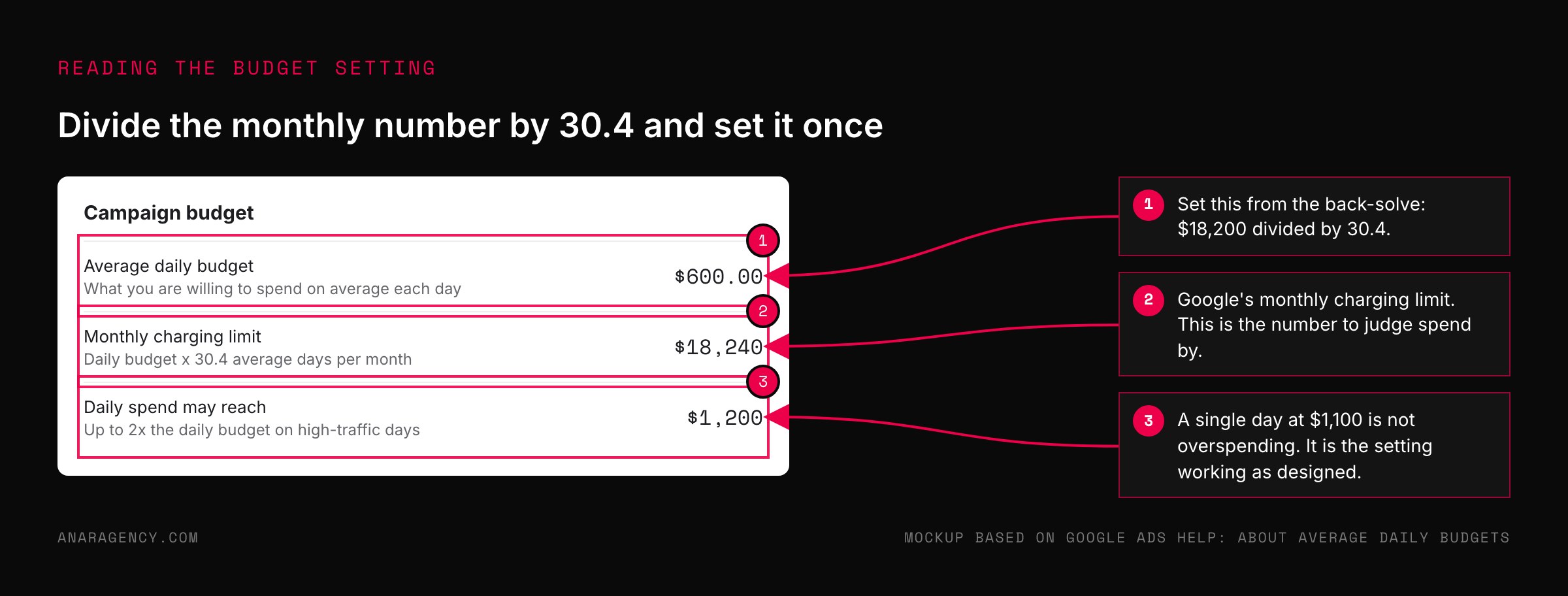
Google does not charge a monthly budget. It charges against an average daily budget, and it can spend up to twice that amount on any single day, as long as the monthly total stays within the daily budget times the average number of days in a month, which Google calculates as 30.4.
A $100 daily budget is a $3,040 monthly cap, and some days will bill $180. Owners who watch day by day read that as overspending. It is not.
It is the setting working as designed.
So convert your back-solved monthly number to a daily budget by dividing by 30.4, and set it once. Google's guide to managing spend explains the monthly charging limit, and the step-by-step for setting an average daily budget is a two-minute job. Change it when the back-solve changes, not when a single day looks high.
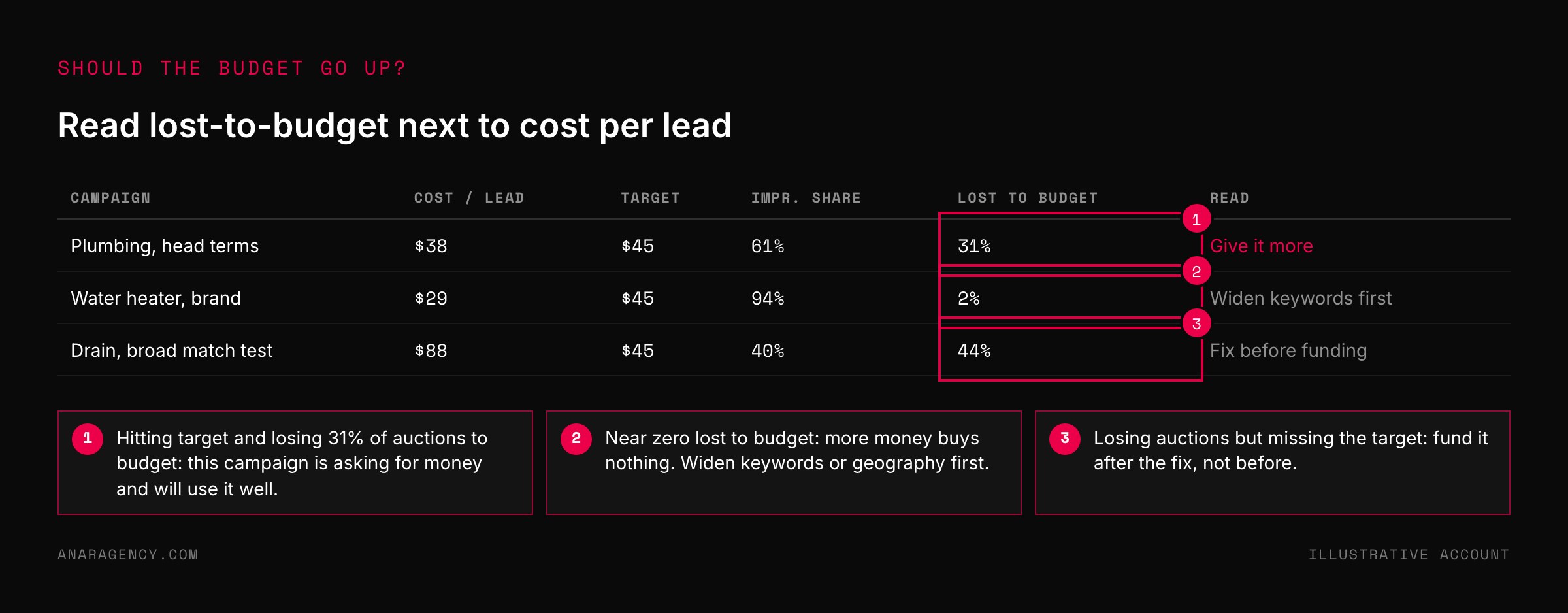
Two reports tell you whether the budget is the constraint. Impression share shows what percentage of eligible auctions your ad entered, and the "lost to budget" column shows how often it was missing because the daily budget had run out.
If lost-to-budget is above 20 percent on a campaign that is hitting its cost per lead, the campaign is asking for more money and will probably use it well. If it is near zero, more budget will not buy more leads. The keyword set or the geography has to widen first.
Performance Planner will model that trade-off for you before you move the money.
Splitting the budget: learn, prove, scale
A single monthly number still has to be divided among campaigns, and the split matters as much as the total.
New accounts lose money on everything at first, because nothing has been tested. Mature accounts lose money only on the slice that is still testing. The mistake in between is putting all the money on the one campaign that worked last month and nothing on finding the next one.
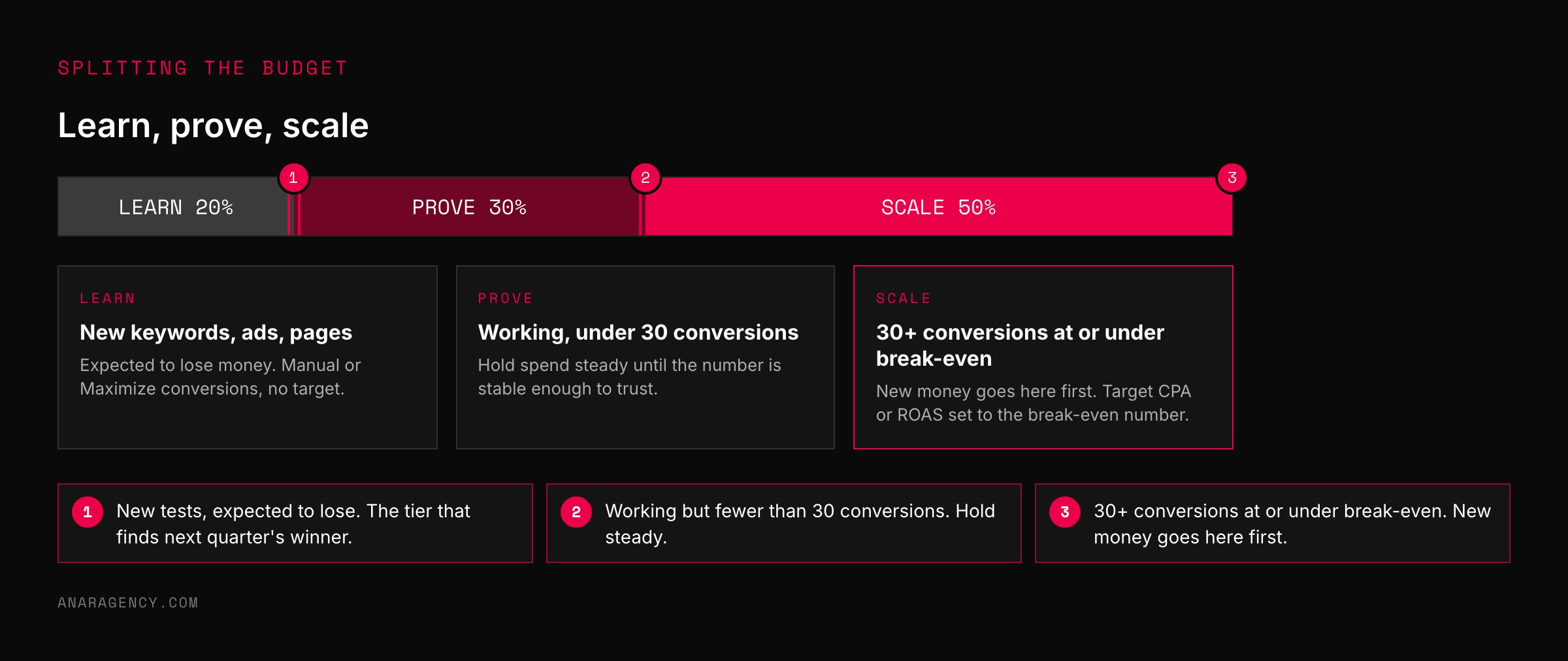
We divide a first-year account three ways. About a fifth goes to learning: new keyword groups, new ad copy, new landing pages, expected to lose. About three tenths goes to proving: campaigns that have produced leads at an acceptable cost but have fewer than 30 conversions, held steady until the number is stable enough to trust.
The remaining half goes to scaling: campaigns with 30 or more conversions in the last 30 days at or under the break-even cost. New money goes to the scale tier first. Money for the learn tier never goes to zero, because a scale campaign that is never replaced eventually exhausts its audience and decays.
Bidding should match the tier. Learn campaigns run on manual or Maximize conversions with no target, because there is no history to target against. Scale campaigns move to a target cost per action or a target return on ad spend once there is data.
Google's guide to choosing a bid strategy based on your goals lays out the options. The only rule we add is that the target you give the algorithm should be the break-even number from your own back-solve, not a number copied from a benchmark report.
Questions executives ask
How much should a small business spend on Google Ads?
Enough to buy the clicks your goal needs, and at least enough to buy about 100 clicks a week per campaign so the results can be read. For a med spa at $8.72 a click that floor is under $900 a week; for a plumber at $41 it is about $4,100. Work backward from customers wanted, close rate, click-to-lead rate, and cost per click to get your own number.
What is a good Google Ads budget for a new account?
Whatever the back-solve says, split roughly 20 percent to new tests, 30 percent to campaigns that are working but have fewer than 30 conversions, and 50 percent to proven campaigns. A brand-new account has no proven campaigns, so the first month is mostly learning, and should be budgeted as a cost of finding out rather than a return.
Why does Google charge more than my daily budget on some days?
Google can spend up to twice your average daily budget on a single day, as long as the month stays within your daily budget times 30.4. The daily figure is an average, not a cap. Divide your monthly budget by 30.4 to set it, and judge spend by the month.
How do I know if I should increase my Google Ads budget?
Check the impression share lost to budget on campaigns that are hitting their cost-per-lead target. If it is above 20 percent, the campaign is leaving affordable clicks on the table and more budget will likely buy more leads at a similar cost. If it is near zero, the budget is not the constraint and you need more keywords or a wider area first.
Can I use industry conversion rates to size my budget?
Only as a placeholder until you have your own. Published conversion rates average across different offers and different definitions of a lead, so they describe no specific business. Run the back-solve at a low and a high rate, plan for the low one, and replace both with your account's real number after the first 50 leads.

Filip Kovacevic is the founder of Anar Agency in Phoenix. He spent five years running SEO, Meta ads, email, and content for medical practices across the United States, and now does the same work for healthcare, home-service, legal, and professional-service businesses, alongside AI implementation. More from Filip →
Talk it through in 15 minutes
Bring one AI question from this article. We will tell you what we would do, whether or not you hire us.
Book a 15-Min Chat →