Hidden Meta Ads Settings That Quietly Wreck Your Account

Meta Ads Manager ships with defaults that favor the platform's automation over your instructions. Audience limits get treated as suggestions. Up to 5 percent of budget can be spent on placements you excluded.
Creative enhancements rewrite your text and images. Site links get pulled from your website. And an account-level test opt-in can re-enable features after you turned them off.
None of these are hidden in the sense of secret; Meta documents every one. They are hidden in the sense that they are on, pre-checked, or tucked under a collapsed panel, and they come back when you duplicate. The fix is a nine-switch check run at four levels of the account, in order, before anything goes live.
Why an account you set up carefully still drifts
You built the campaign carefully. Three weeks later it is running in a way you never chose. Here is how that happens.
Meta's documentation is open about its direction. The platform's own page on what turns Advantage+ on and off explains that most campaigns now start in the recommended setup with Advantage+ on, and that narrowing your budget, audience, or placements turns it off for that section, with a visible score nudging you back.
Meta's overview of Advantage+ describes the goal: respond to real-time data and deliver across the widest audience. For an advertiser with no constraints, that is fine. For a clinic that cannot advertise to minors, a firm licensed in two states, or an owner who wrote the ad copy for a reason, it is a different objective from yours.
The drift happens in three ways. Some settings default to on. Some present your choice as a suggestion instead of a limit, with the suggestion box pre-checked.
And some live at a layer above the one you are editing, so a switch at the account level overrides what you set on the ad.
Add the fact that duplicating a campaign can restore defaults, and a clean account becomes a dirty one without anyone touching a setting on purpose.
What follows is not a complaint about automation. Several of these features help some advertisers, and Meta publishes its own test results for each. It is a map of where the switches are, what Meta says they do, and which ones we set, and why, in every account we run.
Four layers, checked in order
The settings that matter sit at four levels, and the order you check them in matters, because the higher levels override the lower ones.
Start outside Ads Manager, in the account's advertising settings, which hold account-wide controls: creative feature testing, audience controls such as minimum age and excluded locations, and placement controls.
Meta's own guidance on audience controls versus audience suggestions lays out the difference in a table. Controls limit who can see ads from the account. Suggestions guide delivery while the system optimizes.
Account settings cover audiences that should never see ads from you at all.
Then the campaign: budget strategy and the lifetime spending limit. Then the ad set: whether your audience choices are limits or suggestions, and how placements are handled. Then the ad: enhancements, text optimization, site links, catalog, destination.
Each layer has two or three switches that decide whether the ad runs the way you built it.
The reason to go top down is the testing opt-in. Meta's page on text best practices states that if you have opted in to test new optimizations in advertising settings, test enhancements may be applied to eligible campaigns regardless of whether you opted into Advantage+ creative at the ad level.
In plain terms, an account-level switch can turn on a feature you turned off on the ad. Check the top layer first, or the bottom layer is not really set.
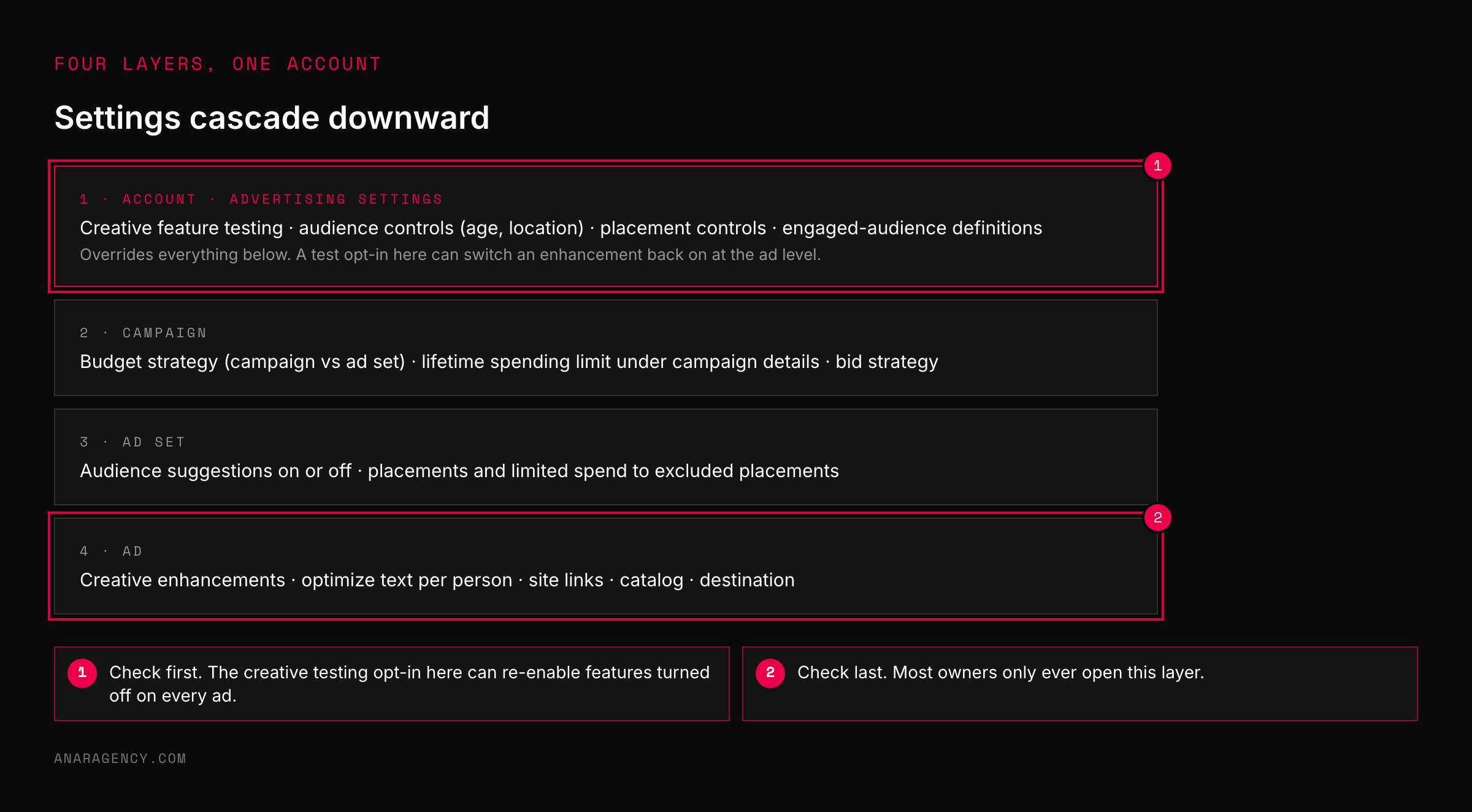
Check four layers in order, top down: account advertising settings, campaign, ad set, ad. Nine switches: audience suggestions off where the audience is a limit; limited spend to excluded placements unchecked; creative enhancements at zero; optimize text per person off; site-link source removed; catalog on manual upload; campaign spending limit set where there is a cap; account-level creative testing off; pixel domain allow list complete. Run it again on every duplicate and once a month on running ads.
The audience switches: limits or suggestions
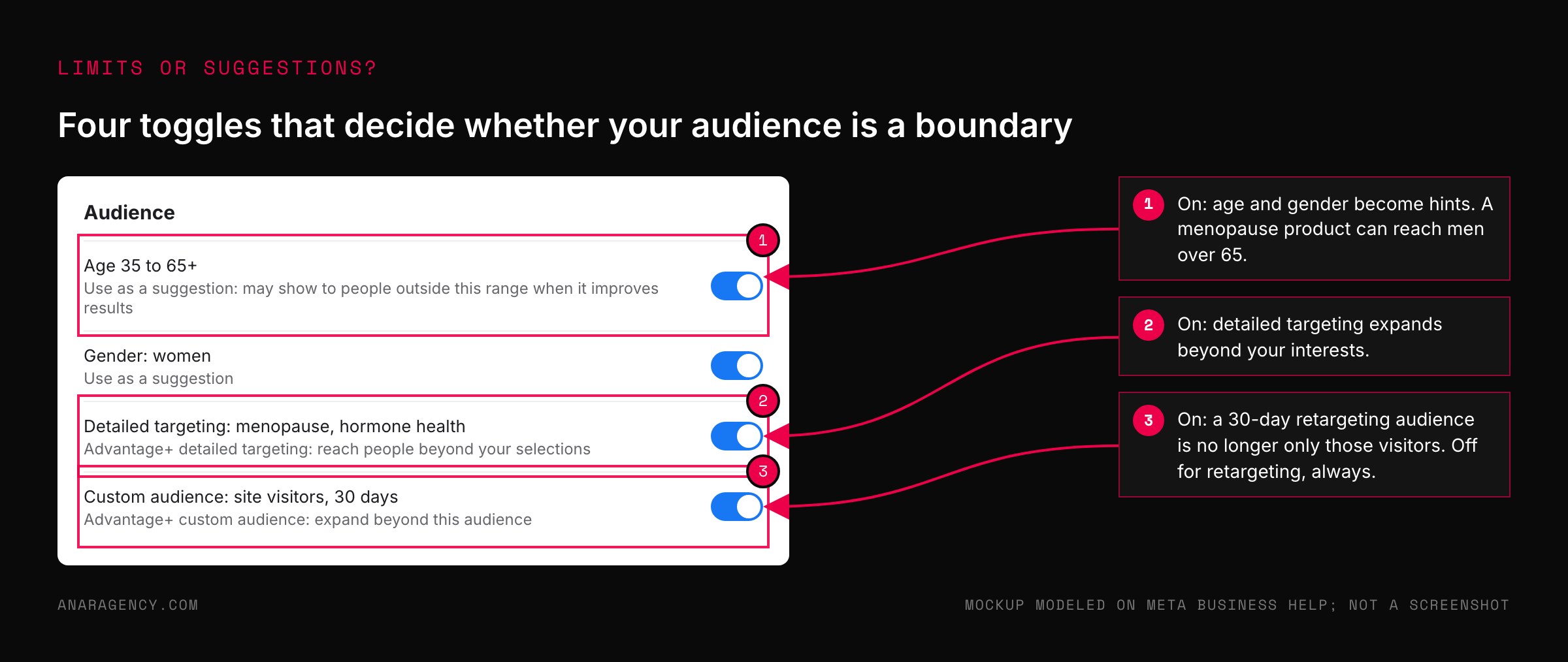
In the ad set, your age range, gender, detailed targeting, and custom audiences can each be treated as a hard limit or as a suggestion that delivery may go beyond.
Meta's pages on Advantage+ audience, Advantage+ detailed targeting, and Advantage+ custom audience each describe the same behavior: the system may deliver beyond the audience you specified when it predicts better results.
That is the right setting for a broad consumer offer with no restrictions. It is the wrong setting for a menopause product that must not reach men, a retargeting ad set built to reach only last month's visitors, or any business with a legal reason to hold a geographic line.
The suggestion toggle is often pre-checked, and the ad set does not look any different when it is. You have to open each section and read it.
Our rule: for retargeting, compliance-bound, and narrowly defined offers, every suggestion toggle goes off and the audience is a limit. For broad cold prospecting, we test both, in separate ad sets, and let the cost per lead decide. We do not let the default decide.
The placement switch with a second box
Meta's Advantage+ placements page reports an 11.7 percent lower cost per action on average in its experiment versus manual placements, and for many accounts leaving placements open is the right call.
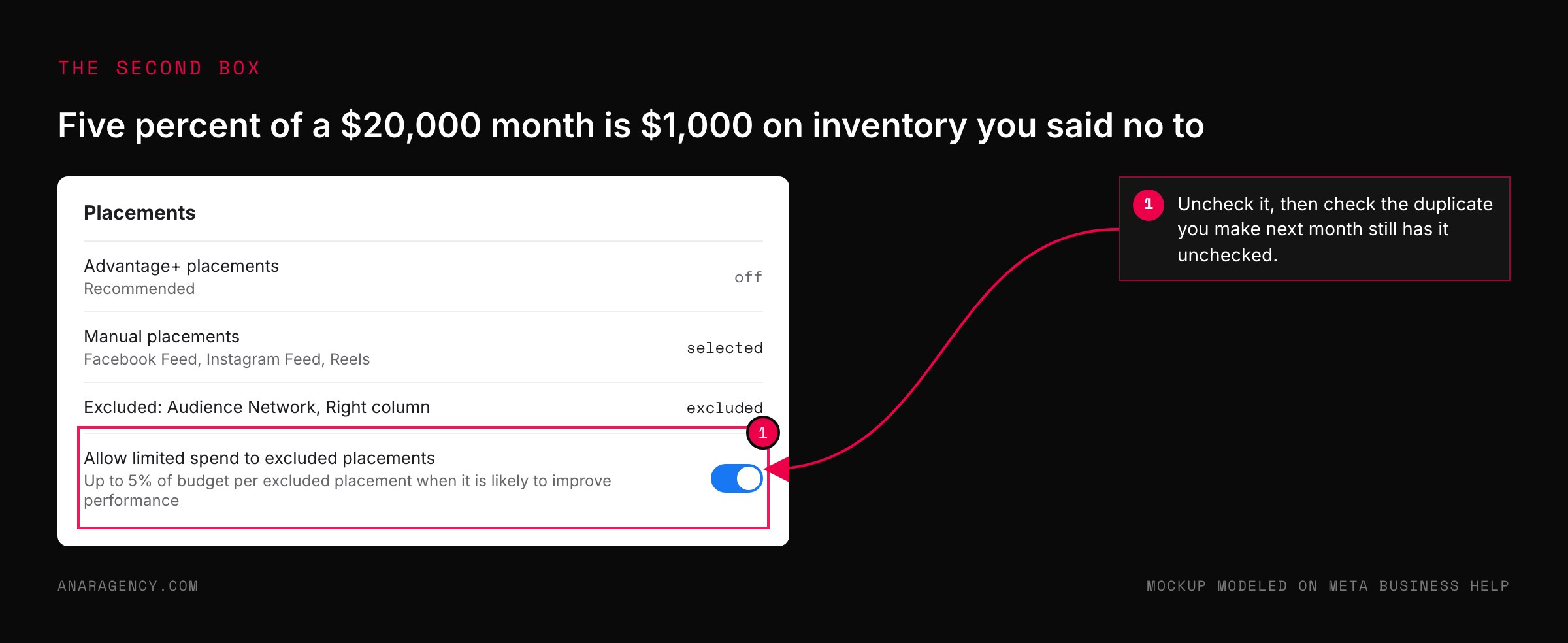
The problem is what happens when you do choose to exclude one. In the campaign creation flow, Meta documents a second checkbox, allow limited spend to excluded placements, which permits up to 5 percent of your budget to be spent on each excluded placement when the system predicts it will help.
Five percent of a $20,000 month is $1,000 on inventory you said no to.
If you excluded Audience Network because of lead quality, or excluded a placement for a brand-safety reason, that box turns your exclusion into a preference. Uncheck it. Then check that the duplicate campaign you make next month still has it unchecked.
The creative switches: enhancements, text, links, catalog
This is the layer most owners never open.
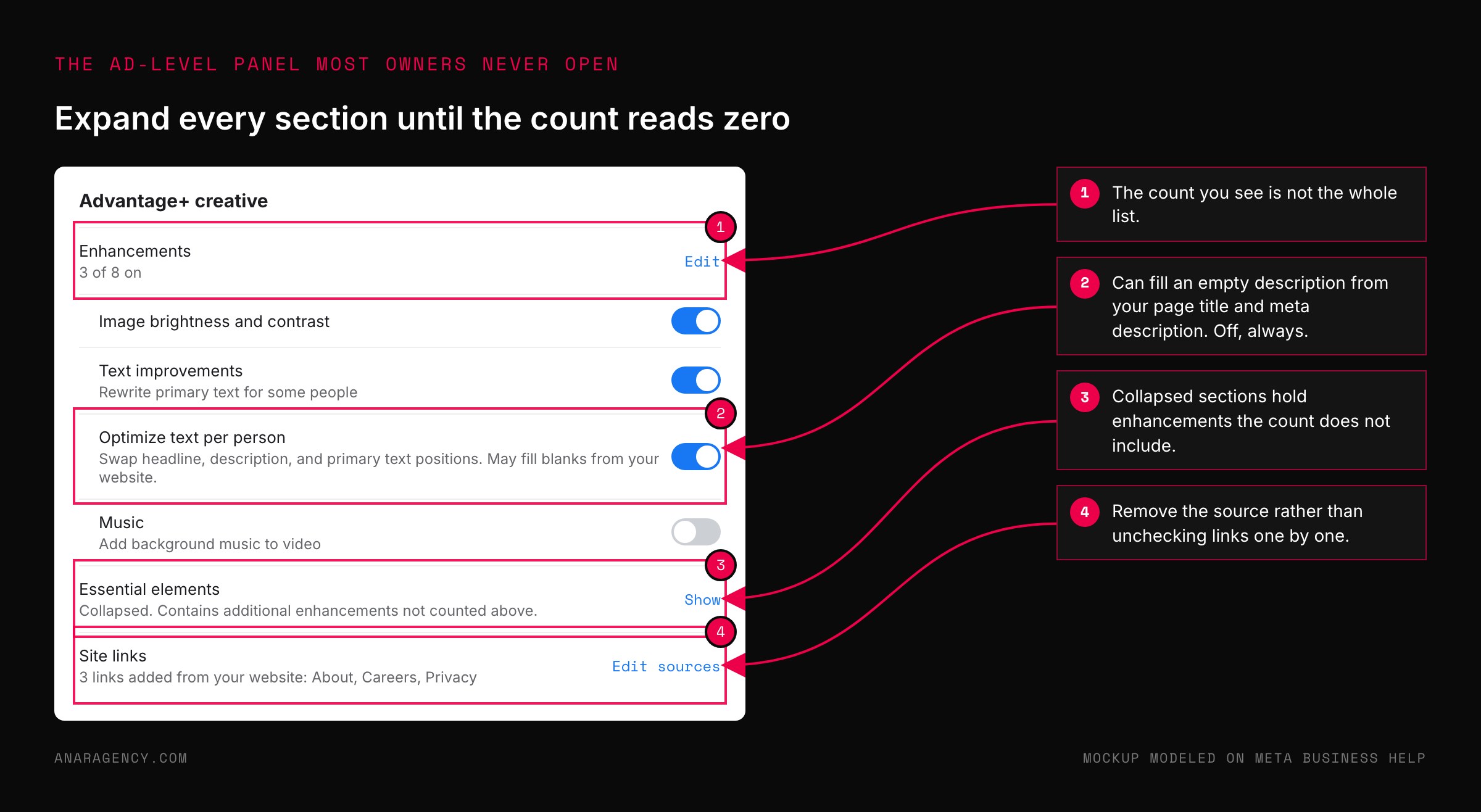
Meta's Advantage+ creative page says plainly that some enhancements may be turned on by default, and the companion page explains how to turn them off. The enhancements can change brightness and contrast, crop and expand images, add music, generate background variations, and rewrite or reposition text.
Meta also publishes a page for reviewing default-on creative features, which is the honest acknowledgement that there is a list to review.
The single enhancement we treat as non-negotiable is optimize text per person. With it on, the headline, description, and primary text can be swapped into each other's positions per viewer, and an empty description field can be filled from your website's page title and meta description.
We have seen ads run with copy nobody wrote, pulled from a page nobody chose. For a regulated business, that is not a performance question. It is a compliance one.
Two more switches live at the ad level. Site links can be pulled from your website and added to the ad unit, sending cold traffic to an About page or a policy page instead of the landing page you built. Remove the source, do not just uncheck links one by one.
And the catalog field can attach a product catalog from any business your login manages, which is how a lead-gen ad ends up showing another company's products. Set it to manual upload unless the ad is meant to use a catalog.
Our standing rule for every account, recorded as a hard rule after we caught a duplicated campaign running with enhancements restored: every creative enhancement off, related media off, and creatives treated as immutable. When a creative needs a change we recreate it instead of editing it, because an edit is one more place a default can return.
Budget, limits, and the duplicate problem
At the campaign level there are two numbers that are easy to confuse.
The budget strategy, documented under campaign budget, decides whether spend is pooled across ad sets and allocated by the system or set per ad set by you. Pooled budget is the Advantage+ default and the recommended option on duplication.
If you want control over how much each audience gets, use ad set budgets. And if you must pool, use ad set spend limits to put a floor and ceiling under each one.
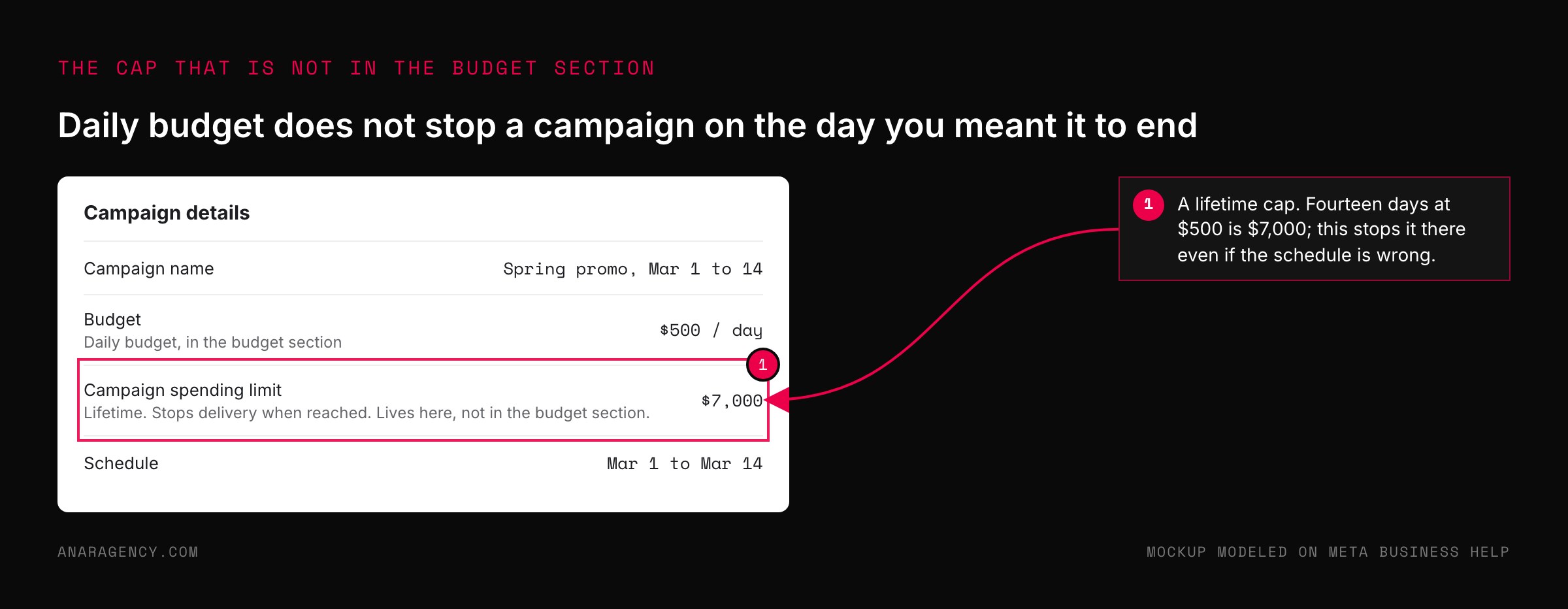
The campaign spending limit is a different thing: a lifetime cap, not a daily one, and it lives under campaign details, not in the budget section. For any promotion with an end date, any account that must not exceed a number, or any day-parted schedule, set it, because the daily budget alone does not stop a campaign from running past the day you meant it to end.
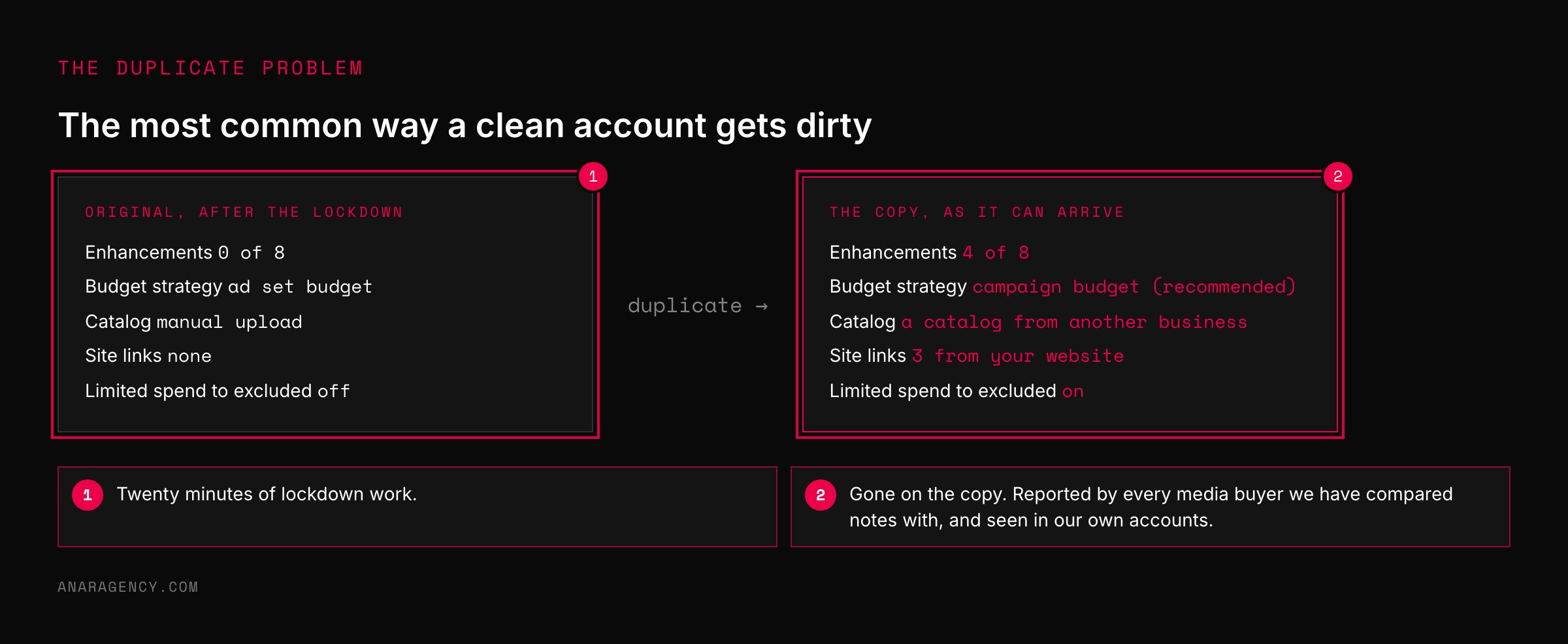
Then the duplicate problem. Copying a campaign, ad set, or ad is the fastest way to launch a variation and the most common way a clean account gets dirty. Enhancements you turned off can be on in the copy.
Budget strategy can flip to pooled. Catalog and site links can repopulate.
Every media buyer we have compared notes with has seen it, and so have we. The rule is simple: a duplicate is a new build, and it gets the full nine-switch check before it goes live.
The Settings Lockdown, as a checklist
Account level: creative feature testing off. Audience controls set for minimum age and any excluded locations. Placement controls set if the whole account must avoid a placement.
Events Manager: a domain allow list on the pixel listing every domain you own, updated the day a new one launches, because a launch microsite that is not on the list sends events nowhere.
Campaign level: budget strategy chosen deliberately, and a lifetime spending limit set when there is an end date or a hard cap. Ad set level: every audience suggestion toggle off where the audience is a limit, and limited spend to excluded placements unchecked if anything is excluded.
Ad level: enhancements panel opened and every section expanded until the count reads zero. Optimize text per person off. Site-link source removed.
Catalog set to manual upload. Destination set to the exact landing page.
Then the last two rules. Run the whole list again on every duplicate. And once a month, open an ad that has been running for weeks and look at its enhancements panel, because Meta adds features over time and a new one can arrive switched on.
Twenty minutes a month is cheap next to a quarter of spend running on settings you never chose.
Questions executives ask
Which Meta Ads settings should I turn off?
For most service businesses: audience suggestion toggles where your audience is a hard limit, limited spend to excluded placements, all creative enhancements, optimize text per person, auto-added site links, and the account-level creative feature testing opt-in. Set a pixel domain allow list and a campaign spending limit where there is a cap. Check them all again after duplicating.
What does Advantage+ creative actually change in my ad?
Depending on the enhancement, it can adjust brightness and contrast, crop or expand images, add music, generate background variations, add overlays, and rewrite or reposition your text. Meta states some enhancements are on by default and publishes a page on how to turn them off.
Why did my ad show text I never wrote?
Usually optimize text per person. It allows the headline, description, and primary text to swap positions, and an empty description can be filled from your website's title and meta description. Turn it off at the ad level and turn off creative feature testing at the account level so it cannot come back.
Does excluding a placement actually stop spend there?
Only if the limited-spend box is unchecked. Meta documents that with it checked, up to 5 percent of budget per excluded placement can still be spent there when the system predicts it will improve performance.
Why do my settings change when I duplicate a campaign?
Duplication does not reliably carry over disabled enhancements, budget strategy, catalog, or site-link settings; the copy can start from the recommended defaults. Treat every duplicate as a new build and run the full settings check before it goes live.

Filip Kovacevic is the founder of Anar Agency in Phoenix. He spent five years running SEO, Meta ads, email, and content for medical practices across the United States, and now does the same work for healthcare, home-service, legal, and professional-service businesses, alongside AI implementation. More from Filip →
Talk it through in 15 minutes
Bring one AI question from this article. We will tell you what we would do, whether or not you hire us.
Book a 15-Min Chat →